With a new version of Edge Chromium there is of course new setting we can do = new ADMX/AMDL files. It is important for admin to keep up so even if we allow auto-update of Edge Chromium there is still work that needs to be done for every new release.
This is the new Group policy settings I found that is new for Edge Chromium 80 and 81.
New Group Policy settings in Edge Chromium 80 and later
| Setting | Description |
| DefaultInsecureContentSetting | Control use of insecure content exceptions |
| InsecureContentAllowedForUrls | Allow insecure content on specified sites |
| InsecureContentBlockedForUrls | Control use of insecure content exceptions |
| LegacySameSiteCookieBehaviorEnabled | Enable default legacy SameSite cookie behavior setting |
| LegacySameSiteCookieBehaviorEnabledForDomainList | Revert to legacy SameSite behavior for cookies on specified sites |
| SmartScreenPuaEnabled | Configure Microsoft Defender SmartScreen to block potentially unwanted apps |
| AlternateErrorPagesEnabled | Suggest similar pages when a webpage can’t be found |
| DNSInterceptionChecksEnabled | DNS interception checks enabled |
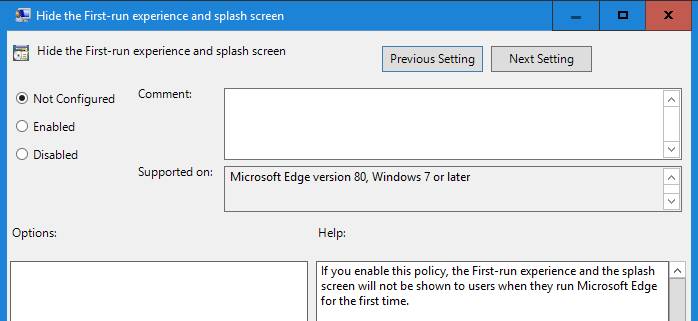
| HideFirstRunExperience | Hide the First-run experience and splash screen |
| PaymentMethodQueryEnabled | Allow websites to query for available payment methods |
| PersonalizationReportingEnabled | Allow personalization of ads, search and news by sending browsing history to Microsoft |
| PinningWizardAllowed | Allow Pin to taskbar wizard |
| TotalMemoryLimitMb | Set limit on megabytes of memory a single Microsoft Edge instance can use. |
| WebAppInstallForceLisl | Configure list of force-installed Web Apps |
| WebRtcLocalIpsAllowedUrls | Manage exposure of local IP addressess by WebRTC |
New Group Policy settings in Edge Chromium 81 and later
| Setting | Description |
| GloballyScopeHTTPAuthCacheEnabled | Enable globally scoped HTTP auth cache |
| AmbientAuthenticationInPrivateModesEnabled | Enable Ambient Authentication for InPrivate and Guest profiles |
| AudioSandboxEnabled | Allow the audio sandbox to run |
| ImportCookies | Allow importing of Cookies |
| ImportExtensions | Allow importing of extensions |
| ImportShortcuts | Allow importing of shortcuts |
| InternetExplorerIntegrationSiteRedirect | Specify how “in-page” navigations to unconfigured sites behave when started from Internet Explorer mode pages |
| OmniboxMSBProviderEnabled | Enable Microsoft Search for Business provider in omnibox |
| StricterMixedContentTreatmentEnabled | Enable stricter treatment for mixed content |
| TLS13HardeningForLocalAnchorsEnabled | Enable a TLS 1.3 security feature for local trust anchors |
Deprecated – removed in future releases
| Setting | Description |
| ForceLegacyDefaultReferrerPolicy | Use a default referrer policy of no-referrer-when-downgrade. |
| WebComponentsV0Enabled | Re-enable Web Components v0 API until M84. |
This one is really nice,”Hide the First-run experience and splash screen” no more first-run experience and splash screen!
“Configure Microsoft Defender SmartScreen to block potentially unwanted apps” is a great addition.

Lesson learned, admin need to keep track and update the .ADMX/ADML for every new release and keep an eye on deprecated settings as well.
Reference = https://docs.microsoft.com/en-us/deployedge/microsoft-edge-policies