
What Works, What Does Not, and What to Expect in Practice
On paper, Cloud PKI looks almost annoyingly simple. Certificate management in Intune without having to run your own PKI sounds like exactly the kind of slideware promise people want to believe. The more interesting question is what that simplicity actually looks like once you try to use it in a real environment.
Certificates are one of those areas most environments already depend on, not because anyone sat down recently and decided the design was good, but because it has been there for years and everything around it grew into it.
Wi-Fi works. VPN works. Devices authenticate. So nobody wants to touch it until they absolutely have to.
That is usually fine until you need to modernize it, extend it, troubleshoot it, or make it work cleanly outside the assumptions it was built on. That is when a lot of “good enough” PKI starts feeling old very quickly.
Why PKI is still a practical problem
Most of the time, PKI is not broken. It is just tied to infrastructure, dependent on internal connectivity, and built on trust assumptions that made more sense when everything lived inside the same boundary.
Most of the time, that stays invisible. But when it shows up, it becomes obvious very quickly how much of the design is still there simply because nobody ever had a reason to challenge it.
That is why Cloud PKI gets interesting. Not because certificates suddenly became exciting again, but because a lot of teams are tired of carrying infrastructure that mostly exists to support older assumptions.
What Intune Cloud PKI changes
The simple version is this: in the cloud-root model, you can stop running your own issuing CA infrastructure for Intune-managed certificate scenarios.
That means no on-prem servers in the Cloud PKI issuance path, less need to run your own CRL publishing infrastructure for that part of the model, and no NDES or Intune certificate connector dependencies in the Cloud PKI model itself.
But that still does not fully capture the bigger shift.
What actually changes is where PKI lives and how much surrounding infrastructure you are expected to keep dragging along with it.
How Intune Cloud PKI works in practice
The first thing you notice is that this does not really feel like a traditional PKI deployment. You are not building out the usual supporting pieces around it. You configure policies, assign them, and certificates start showing up. If you come from AD CS, that first reaction is usually somewhere between “that was easy” and “what am I missing?”
And for common device-focused scenarios, that simplicity is one of its strongest qualities. It also explains most of the friction, because simple is not the same thing as equivalent, even if people keep treating it that way.
Where the model starts to feel different
You usually notice that the moment you try to do something even slightly outside the happy path. The flexibility many teams are used to from traditional PKI is not really there in the same way, because Cloud PKI is built around Intune-managed devices, issuing CAs in Intune, and SCEP-based certificate delivery.
Cloud PKI is more constrained. More opinionated. That is a big part of why it feels easier. The mistake is assuming that simplicity means it covers the same ground as traditional PKI. That is usually where the first disappointment starts.
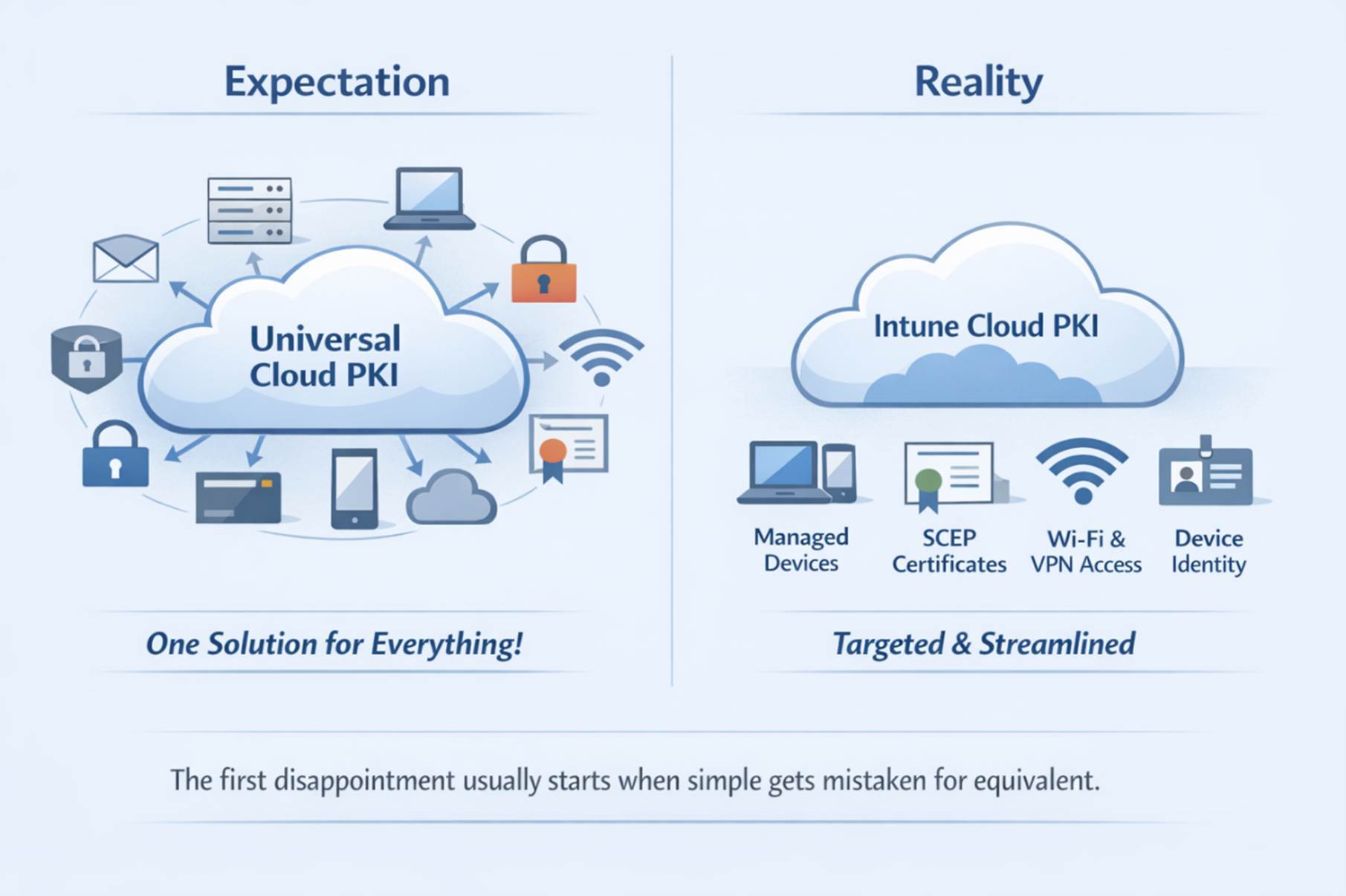
“We’ll replace everything” does not really hold up
This is probably the clearest reality check in the whole discussion. On paper, “we will replace our PKI with Cloud PKI” sounds clean. In practice, most environments are not built in a way that makes that true. There is almost always something left that still depends on a traditional CA, older integrations, or trust assumptions that were never designed to be modernized this way.
So what usually happens is not that you replace PKI. You split it. Cloud PKI takes care of the cleaner, more modern device scenarios. Something else stays behind for the parts that do not fit. That does not make the model weak. It just means the story gets messier the moment you move outside standard managed endpoint scenarios.
That also changes how trust feels. In older environments, trust is often so implicit that nobody talks about it anymore. It is just there. With Cloud PKI, that becomes more visible. You have to think more explicitly about where the CA is trusted, how that trust chain is established on devices and relying parties, and what actually happens outside your managed device scope.
Nothing necessarily breaks because of that. But a lot of things stop feeling automatic, and that is usually when expectations start shifting. You normally do not notice it on day one, because deployment is straightforward enough. You notice it later, when something behaves differently than you expected and the old troubleshooting instincts do not help as much.
If you are used to traditional PKI, it can feel like you have less of the usual troubleshooting surface to work with. Not necessarily worse, but less familiar and sometimes less transparent than teams expect. That is usually the point where it becomes obvious that Cloud PKI is not some universal replacement.
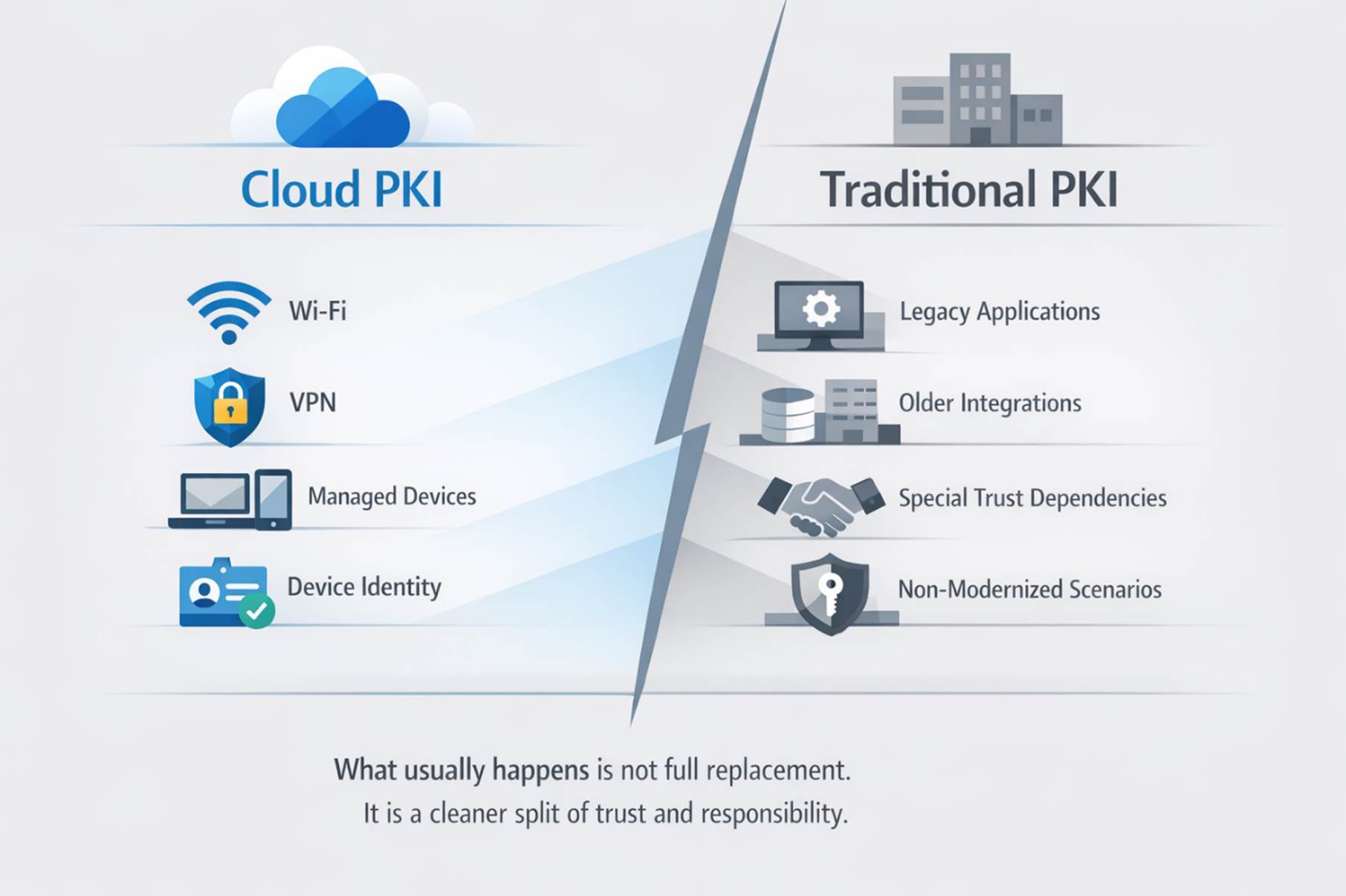
Best use cases for Intune Cloud PKI
Once you stop comparing it directly to AD CS, Cloud PKI starts making a lot more sense. Especially when certificates are tied closely to managed devices and the goal is to reduce infrastructure, not rebuild every old PKI pattern in a newer place. That is also why I do not think Intune Cloud PKI should automatically be treated as a full replacement for AD CS or every private CA design.
In practice, the best Intune Cloud PKI use cases are certificate delivery for managed devices, Wi-Fi authentication, VPN, device identity, and other endpoint-heavy scenarios where simplicity matters more than theoretical flexibility. That matters from a platform perspective too, because this is not some narrow Windows-only story. Cloud PKI supports Windows, macOS, iOS/iPadOS, and Android, as long as the devices are Intune-enrolled and the platform supports the Intune SCEP certificate profile.
If I were advising on the design, I would keep the recommendation very simple: use Cloud PKI where it removes friction for modern, managed endpoints, and keep traditional PKI where the environment still needs the older flexibility, integration depth, or trust model. That is usually the honest architecture. Pretending Cloud PKI should replace everything just because the slide looks cleaner is the less honest version.
So what is the actual takeaway?
Cloud PKI makes a lot more sense the moment you stop thinking about it as your new universal PKI and start treating it as a modern certificate service for managed devices.
That is where it fits best: where the surrounding assumptions are already modern enough to support that model. Expect more than that and it will start feeling limited fairly quickly.
FAQ: Microsoft Intune Cloud PKI
Can Intune Cloud PKI replace AD CS?
In some modern device-focused scenarios, yes. In most real environments, no. There is usually still something that depends on a traditional CA, older integrations, or trust assumptions that Cloud PKI is not really built to replace.
What are the main Intune Cloud PKI limitations?
The biggest limitation is expectation mismatch. Cloud PKI is simpler because it is more constrained. That works well for managed endpoint scenarios, but it becomes more limiting once you move into legacy-heavy, mixed, or more specialized certificate use cases.
What are the best use cases for Intune Cloud PKI?
It fits best in modern, managed device scenarios such as Wi-Fi authentication, VPN, device identity, and other endpoint-driven use cases where simplicity and reduced infrastructure matter more than maximum flexibility.
Is Intune Cloud PKI easier to manage than AD CS?
In many ways, yes. It removes a lot of the infrastructure overhead and feels much simpler to deploy and operate. But that simplicity comes from a more opinionated model, which means some teams will run into less flexibility and a different troubleshooting experience than they are used to.
Conclusion
To me, Cloud PKI is interesting for a fairly simple reason: it removes a part of the environment many teams no longer want to operate.
But that does not mean it replaces everything. What it really does is change the model. Some things get simpler. Some things need to be rethought. And some things stay exactly where they already are.
If you expect it to behave like your existing PKI, it will feel limited fairly quickly. Use it where it actually fits, and it can remove a surprising amount of complexity without losing the parts that matter.
That is probably the real takeaway. Cloud PKI is not interesting because it replaces everything. It is interesting because it lets you stop dragging old PKI infrastructure into places where it no longer fits particularly well.